Clear theory, real practice and mock exams. All in your pocket, from zero to exam day.
Each tool is designed for a different stage of your preparation.
96 lessons in 9 modules covering the 200-301 exam. Open any of them or follow the recommended order.
15 labs where you configure routers, switches and PCs with Cisco IOS commands. Objectives check themselves.
Timed mock exams like the real one: one question at a time, flag for review, score per domain and history.
Unlimited subnetting, VLSM, wildcard and IPv6 exercises, with timed challenges to build speed.
148 real faults solved step by step and 508 exercises with real Cisco IOS configurations and outputs.
What you get wrong comes back after 1, 3 and 7 days, and you review the 295 glossary terms with "I know it / Review again".
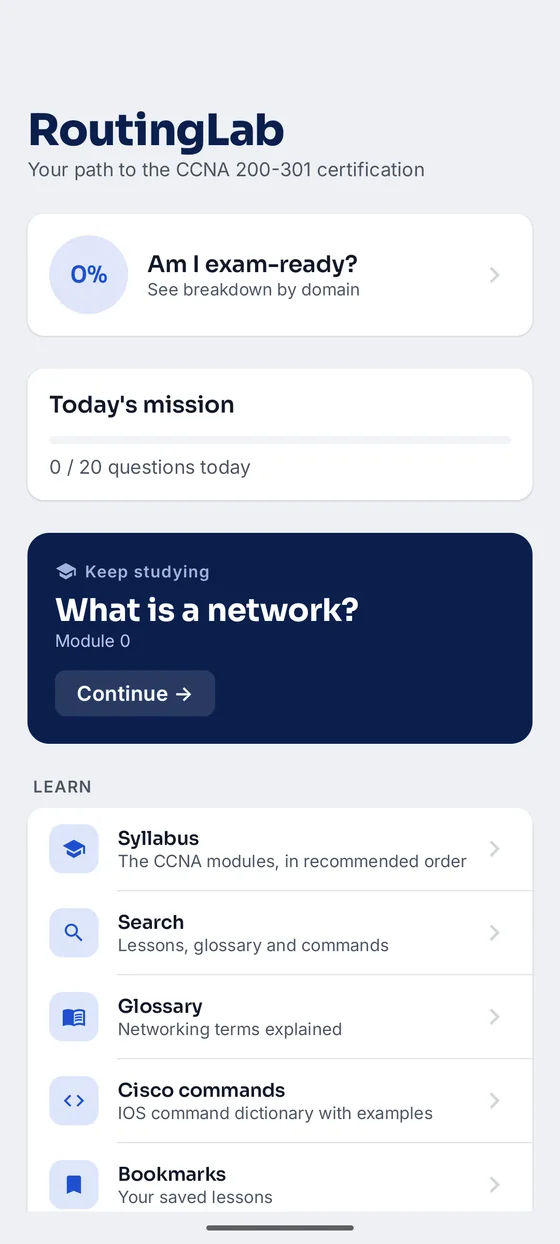
Tap any section to see it. These are real screenshots of the app.
5 real questions from the CCNA syllabus. No sign-up, right here.
Nothing to install, no sign-up. Use them while you study.
Subnets, VLSM, wildcard masks for ACLs and OSPF, and IPv6 with EUI-64: everything the exam asks you to work out, instantly.
Open →The ports and protocols that come up in the exam, searchable in a second.
Open →15 guided labs with topology, step-by-step solution and the expected output of every command.
Open →295 terms explained in plain English, with a live search box.
Open →Tell us when you sit the exam and how much you can study. We'll work out the pace you need.
A rough estimate based on the app's syllabus (96 lessons and 3,868 questions) and the hours the CCNA 200-301 usually takes depending on your starting point.
7 days of full access when you sign in. Cancel whenever you want.
Works out at €2.50/month
No commitment
Free forever: modules 0 and 1, 2 labs, the Subnetting Trainer, the glossary, the flashcards and mistake review.
Prices in Spain. In other countries, Google Play shows you your local price.
No. Module 0 ("Absolute Basics") is written for someone starting from scratch. The app recommends an order, but you can open any lesson if you already know a topic.
Yes. The app has 15 labs with a simulated IOS terminal: you configure routers, switches and PCs by typing Cisco commands, with abbreviations, ? help and the error messages of a real device. The website has the same exercises as Packet Tracer guides.
Yes. All the content (theory, questions, exercises) is inside the app, so you can study on the underground or anywhere without signal. A connection is only needed to sync your progress to the cloud.
Signing in with your Google account unlocks all the content for 7 days. You can see the whole app and decide at your own pace whether subscribing is worth it.
Yes, as long as you sign in with Google. Your progress is stored in the cloud and you get it back on any device with the same account.
Of course. It is managed from your Google Play account, like any other subscription, and you can cancel it in two taps without explaining yourself.
Not yet. We started with Android and the iOS version is on the roadmap. Write to soporte@routinglab.es if you want it and we will let you know as soon as it is out.
Download RoutingLab and study a little every day. The exam is passed with consistency, not with cramming.
Get it on Google PlayComing very soon · Android 7.0 or later